

Turn your AAC, M4A, M4B, 3GP or MP4 files into MP3 and WAV files or extract the audio from MPEG-based video formats. Additional features include drag-and-drop support and batch processing capabilities.
Free M4a to MP3 Converter transforms all your MPEG4-based audio and video files into WAV or customizable MP3 audio files. Its simple and intuitive interface makes this tool suitable for all kinds of users, and allows you to batch-convert any number of AAC, M4A, MP4, or 3GP files into MP3 or WAV files in a snap. Besides, the program can also re-encode your M4B audiobooks into any of the output formats supported in a simple and efficient way.
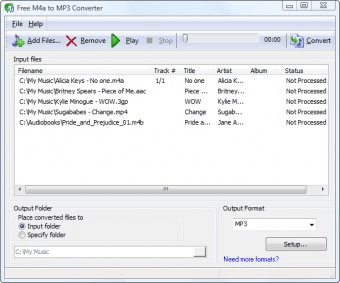
The program’s main window couldn’t be any simpler – your conversion list has been placed into a large central area, where you can add as many files and folders as needed. You can tell the program to play back any of those tracks in case you need to make sure you selected the right ones. You can also do that with whatever MPEG-4 video file whose audio soundtrack you wish to extract – not being a video player, though, you will only be able to listen to the video’s audio stream.
Free MP4 to MP3 Converter can re-encode your audio files into two possible output formats only, MP3 and WAV. If you select MP3 for the output, you will be allowed to tweak a couple of parameters to customize your resulting audio files, i.e., the bit rate, the sampling rate and the number of channels. Regrettably, the program includes no support for Variable Bit Rate MP3 conversions, which is a bit of a pity now that V0 MP3 rips seem to have become the norm among audiophiles.
The conversion process itself requires no further intervention on your side – you will be shown sequential progress bars for each of the items on the conversion list until the last item has been processed. You can mix any amount of files (both audio and video, and in any of the input formats supported – namely, 3GP, M4A, AAC, and M4B) on the same conversion list, which will save you lots of time. If only for this feature, Free MP4 and MP3 Converter is an app worth trying. You will be surprised by the flexibility of its conversion process, even though the number of media formats supported is certainly small.





Comments